

Elevate your digital art and social media presence with these elegant, high-fashion AI prompts featuring sophisticated poses, luxurious garments, and magical backdrops.
Creating visually stunning digital portraits has never been more accessible, thanks to the evolution of advanced artificial intelligence tools. For creators seeking a sophisticated and high-fashion aesthetic, elegant girl prompts offer the perfect solution. These prompts combine classical beauty, luxury garments, and imaginative settings to produce images that look like they belong on the cover of a high-end fashion magazine or a trending Instagram feed.
The secret to generating an elegant portrait lies in the delicate balance of composition, attire, and atmosphere. Whether it is an Indian woman wearing a festive pastel saree surrounded by falling lotus petals, or a beautiful girl descending a grand staircase in a lavish mansion, every detail contributes to a sense of luxury and grace. By utilizing specific styling cues and poses, you can guide the AI to create breathtaking, photorealistic masterpieces.
In this article, we will explore ten incredible prompts that focus on elegant themes, ranging from traditional festive looks to whimsical fairytale settings. We will break down the anatomy of these prompts, discuss the best tools for the job, and provide practical tips to help you achieve flawless results. Get ready to transform your creative vision into high-resolution digital art.
What Are Elegant Girl's AI Prompts?
Elegant Girl's AI Prompts are highly detailed text descriptions formulated to instruct AI image generators to create portraits of women and girls that embody grace, sophistication, and luxury. These prompts focus heavily on high-fashion garments, structured poses, and dramatic, high-quality lighting. By specifying intricate details such as fabric types, embroidery, jewelry, and artistic environmental backdrops, these prompts ensure that the generated images are polished, professional, and visually captivating.
Unlike standard portrait prompts, elegant prompts often incorporate elements of magical realism and cultural heritage. They might describe a girl in an Anarkali dress surrounded by flash-frozen diamond smoke sculptures, or a young child spinning in a deep navy blue velvet lehenga decorated with shimmering silver stars. These detailed descriptions help the AI understand the exact texture, drape, and movement of the clothing, resulting in a highly realistic and artistic output.
Why Elegant Girl's AI Prompts Is Trending
The trend of generating elegant, high-fashion portraits is sweeping across digital art communities and social media platforms. Users are constantly looking for ways to elevate their profiles with unique, eye-catching content. Elegant girl prompts allow creators to generate aspirational, luxury-themed imagery that immediately stands out. The combination of traditional ethnic wear with modern, avant-garde concepts creates a striking visual contrast that is highly shareable and engaging.
Additionally, the accessibility of advanced AI models has democratized high-fashion photography. Anyone can now create a cinematic image of a girl in a breathtaking fairytale gown on a wooden bridge in a mushroom forest, without the need for expensive location scouting, designer outfits, or professional lighting crews. This ease of creation, combined with the stunning realism of the output, has made elegant AI portraits a major trend in digital content creation.
Popular Styles You Can Create
Our curated list of elegant prompts allows you to explore various artistic directions, from traditional South Asian festive looks to whimsical fantasy and modern street style. Here are some of the popular styles you can generate using these prompts:
- Multi-Pose Cinematic Collages: Features an Indian woman in a festive pastel saree surrounded by falling translucent white lotus petals, captured in close-up, profile, and full-body stances.
- Grand Mansion Elegance: Depicts a beautiful girl in an intricate, floor-length gown descending a sweeping staircase illuminated by soft chandelier lighting.
- Avant-Garde Luxury: Showcases a girl in a festive pastel Anarkali surrounded by thick pastel smoke plumes flash-freezing into solid diamond sculptures.
- Vibrant Bazaar Realism: Captures an Indian girl in a colorful lehenga-choli playfully navigating a bustling bazaar filled with spices, fabrics, and warm market lights.
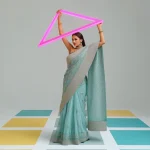
- Graceful Movement: Focuses on a poised Indian woman forming a spiral arc with her body, allowing her pastel saree dupatta to flow outward in soft curves.
- Whimsical Fairytale: Features a beautiful girl in a breathtaking gown standing on a wooden bridge in a forest filled with giant, glowing mushrooms and fireflies.
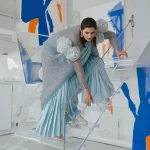
- Urban Fusion: Combines a modern Anarkali dress with contemporary prints against a vibrant, abstract urban mural backdrop.
- Magical Childhood: Captures a young girl mid-spin in a navy blue velvet lehenga adorned with shimmering silver stars, crescent moons, and constellations.
- Dreamy Dusk Nostalgia: Depicts a girl with a wistful gaze standing before a brightly lit, spinning carousel in an amusement park at dusk, holding a fluffy toy.
- Artistic Paint Splatters: Focuses on a minimalist studio portrait of a beautiful girl with vibrant, artistic paint splatters applied elegantly to her face.
By experimenting with these diverse styles, you can easily find the perfect aesthetic for your social media feed, digital portfolio, or creative design projects.
How to Use Elegant Girl's AI Prompts
To get the most out of these detailed prompts, it is helpful to follow a structured generation process. This ensures that the AI accurately interprets the complex details of the clothing, pose, and background. Follow this seven-step guide to generate your own elegant portraits:
- Select an elegant prompt from our list that matches your desired theme, whether it is traditional, modern, or fantasy.
- Identify the key garments, fabrics, and jewelry mentioned in the prompt to ensure they align with your visual goals.
- Choose a high-quality AI image generation platform that excels at rendering detailed textures and realistic human figures.
- Copy the selected prompt and paste it into the generator's text input field.
- Set your desired aspect ratio, such as 9:16 for mobile wallpapers and Instagram stories, or 1:1 for standard social media posts.
- Initiate the generation process and allow the AI to render the initial set of image options.
- Select the image that best captures your vision, or make minor adjustments to the prompt (such as changing colors or lighting) to fine-tune the final result.
What Kind of Base Photo Works Best?
If you are using an image-to-image generator to transform an existing photo into an elegant AI masterpiece, choosing the correct base photo is essential. The AI relies on the structure, lighting, and pose of your original image to build the new, stylized version. A high-quality base photo will yield a much more polished and realistic final output.
For the best elegant results, select a base photo where the subject is in a poised, balanced posture. The lighting should be soft and even, avoiding harsh highlights or deep shadows that can distort facial features. A clean, simple background is preferred, as it allows the AI to focus on rendering the complex details of the elegant gown, lehenga, or saree without getting confused by background clutter. Ensure the subject's face is clear and facing forward or in a elegant side profile.
Which AI Tools Deliver the Best Results?
Several advanced AI image generators are highly capable of rendering the intricate details, luxurious fabrics, and complex lighting setups described in our elegant prompts.
| AI Tool | Best Feature | Ideal Prompt Style |
|---|---|---|
| ChatGPT | Excellent at expanding simple ideas into highly detailed, elegant descriptions. | Conceptual fashion ideas and narrative scene building. |
| Gemini | Superb understanding of cultural contexts, traditional attire, and natural poses. | Traditional sarees, lehengas, and bustling bazaar scenes. |
| Midjourney | Outstanding artistic rendering, realistic fabric folds, and magical fantasy lighting. | Fairytale gowns, grand staircases, and glowing mushroom forests. |
| Flux | Incredible precision with complex embroidery, patterns, and jewelry details. | Intricate Anarkalis, diamond smoke, and close-up portraits. |
| Leonardo | Highly customizable style models that allow for fine-tuning contrast and realism. | Artistic paint splatters, carousel scenes, and studio portraits. |
Simply copy your favorite prompt from our selection and paste it into any of these powerful platforms to begin your creative generation process.
Pro Tips
To ensure your generated images look like professional, high-fashion photography, keep these helpful tips in mind when writing or modifying your prompts:
First, always specify fabric textures. Using words like "navy blue velvet," "shimmering rainbow chiffon," or "intricate lace" guides the AI to render realistic fabric weight, folds, and reflections, making the garments look incredibly high-end.
Second, define the pose clearly. Instead of just asking for a portrait, describe the physical action, such as "descending a grand staircase," "lifting her toes slightly," or "mid-spin with arms outstretched." This helps avoid stiff, unnatural-looking postures.
Lastly, pay attention to the lighting details. Mentioning specific light sources like "warm chandelier lighting," "glowing firefly sparkles," or "vibrant carousel lights at dusk" adds depth and atmosphere, elevating the cinematic quality of your image.
Common Issues and Quick Fixes
Generating highly detailed clothing and complex backgrounds can sometimes present challenges. Here are some common issues you might encounter and how to quickly resolve them:
| Common Issue | Root Cause | Quick Fix |
|---|---|---|
| Blurry or distorted clothing patterns | The AI is struggling to render complex traditional embroidery. | Use terms like "ultra-detailed," "sharp focus," or "high-resolution 8k" to force the AI to render finer details. |
| Unnatural body proportions in active poses | Complex poses (like twirling or spiral arcs) confusing the AI's structural model. | Simplify the pose description, or add terms like "graceful, balanced posture" to guide the anatomy model. |
| Over-saturated or unrealistic lighting | Too many conflicting light sources described in the prompt. | Stick to one or two dominant light sources, such as "soft chandelier lighting" or "natural dusk sunset glow." |
By applying these quick fixes, you can easily refine your prompts and achieve flawless, high-fashion results with every generation.
Frequently Asked Questions
Which AI generator is best for rendering intricate clothing like sarees and lehengas?
You can paste these prompts directly into platforms like Midjourney, Flux, Leonardo, ChatGPT, or Gemini to render highly detailed textures, embroidery, and fabric folds.
How do I get realistic poses in my AI-generated portraits?
Use specific action keywords in your prompt, such as "descending a grand staircase", "mid-spin laughing joyfully", or "forming a spiral arc with her body".
Can I use a personal photo as a base for these elegant prompts?
Yes, using a clear, front-facing portrait with neutral lighting as a base photo helps the AI maintain facial features while applying the elegant clothes and backgrounds.
Conclusion
Generating elegant girl AI portraits is a fantastic way to express your creative vision and produce stunning, professional-grade digital art. By focusing on luxury garments, graceful poses, and atmospheric lighting, you can create images that look like they belong in a high-fashion magazine. Whether you choose to paste these prompts into Midjourney, Flux, or Leonardo, you are sure to achieve breathtaking results. Select your favorite prompt from our list, start generating, and elevate your digital portfolio today!